
Do SATA SSDs Need Heat Sink?
- Yongxing
- 23 Mar ,2026
Many buyers worry about SSD heat. They see heat sinks on fast drives and start to think every SSD may need one too. That fear often leads to extra cost and extra parts.
Most SATA SSDs do not need a heat sink in normal use because they run at lower speed, create less heat, and work well inside ordinary airflow conditions. A heat sink only becomes useful in a few hot or closed environments.
That is the simple answer. Still, the full picture matters. SATA SSD temperature depends on interface speed, controller load, case airflow, drive location, and workload pattern. A drive that stays cool in one system may run warmer in another. So it helps to look at how SATA SSDs work before making a cooling decision.
Why Do SATA SSDs Generate Less Heat?
Small storage devices can still get warm, so it is fair to ask why SATA SSDs usually stay cooler than many newer SSD types. The main reason is simple. A SATA SSD moves data through a slower interface, so the controller and flash system do not have to work as hard during heavy transfer.
SATA SSDs generate less heat because their speed ceiling is lower, their power draw is often modest, and their controllers usually handle less bandwidth than NVMe drives. Less electrical load means less heat in most daily tasks.
A SATA SSD is limited by the SATA bus, which usually tops out around 6 Gb/s in SATA III systems. In real use, many drives land near the practical ceiling of about 500 to 560 MB/s. That is much lower than many NVMe SSDs. Since the drive cannot push extreme bandwidth, its controller, NAND channels, and firmware activity stay within a more modest range. That lower activity often leads to lower temperature.
Lower speed means lower stress
Heat in solid-state storage comes from electrical activity. When a controller works harder, it draws more power. When it draws more power, it creates more heat. SATA SSDs usually avoid that problem because they do not chase very high transfer numbers.
A simple way to think about it is this: the drive does not need to sprint all the time. It works at a steady pace. That steady pace helps keep temperatures under control.
| SSD Type | Typical Interface Limit | Usual Heat Level | Heat Sink Need |
|---|---|---|---|
| SATA SSD | ~550 MB/s practical | Low to moderate | Rare in normal use |
| NVMe PCIe 3.0 SSD | Much higher | Moderate to high | Sometimes useful |
| NVMe PCIe 4.0/5.0 SSD | Very high | High | Often recommended |
Power design is usually simpler
Many SATA SSDs are built for broad use in laptops, desktops, mini PCs, office systems, and embedded devices. Because of that, manufacturers often design them for stable power use rather than peak benchmark results. The controller may be simpler. The thermal load may be easier to manage. The casing itself may already spread some heat.
This does not mean every SATA SSD runs cool all the time. Large file copies, long write jobs, bad airflow, and hot rooms can still raise temperature. But in normal office work, web use, boot tasks, gaming load screens, and media playback, a SATA SSD usually stays within a safe range without special cooling.
Real-world workload is often light
Most people do not write hundreds of gigabytes every hour. Most systems read small files, open apps, load game assets, and save user data in short bursts. Those bursts do not always last long enough to push a SATA SSD into a serious thermal problem.
That is why many SATA SSDs ship without a heat sink and still perform well for years. In many systems, the surrounding airflow from case fans or laptop internal flow is already enough.
How Does SATA Interface Affect SSD Temperature?
Interface choice has a direct effect on heat because interface speed shapes controller work, queue depth, and data flow behavior. SATA is not only a connector standard. It also sets a practical performance boundary that limits how much heat the drive is likely to create.
The SATA interface affects SSD temperature by capping bandwidth and keeping controller activity lower than high-speed PCIe storage. Because data moves through a narrower path, the drive usually runs cooler during the same type of workload.
When people compare storage heat, they often focus only on the NAND flash. That is not the whole story. The controller is often the key heat source. The interface decides how aggressively that controller has to process commands and move data. SATA does not demand the same level of throughput that PCIe NVMe does, so the thermal pressure is often lower.
SATA keeps the data path narrow
A SATA SSD talks to the system through the AHCI stack and SATA link. This setup is mature and dependable, but it is not built for the deep parallel performance seen in NVMe. That matters for temperature. Lower queue efficiency and lower bandwidth keep the drive from hitting the same thermal peaks seen in faster devices.
In plain terms, SATA creates a narrower road. Fewer cars can move at once. That limits traffic, and it also limits the heat that comes from intense traffic.
The interface shapes burst and sustained load
A drive can look cool during short tasks and warm during sustained tasks. SATA helps on both sides. Short bursts end quickly, and long transfers remain limited by the interface ceiling. The drive may still warm up, but there is less room for sudden thermal spikes.
SATA vs NVMe temperature behavior
The table below shows the general pattern.
| Factor | SATA SSD | NVMe SSD |
|---|---|---|
| Interface bandwidth | Lower | Much higher |
| Controller workload | Lower in most cases | Higher in heavy load |
| Sustained thermal rise | Usually modest | Often stronger |
| Thermal throttling risk | Low in normal systems | More common under load |
| Need for added cooling | Usually low | Depends on model and use |
The host system still matters
The interface is important, but it is not the only factor. A SATA SSD inside a cramped fanless box may run warmer than a well-cooled NVMe drive in a tower PC. So the SATA limit helps, but system design still matters.
I have seen many users assume that a SATA SSD should be completely cold because it is “slower.” That is not true. Warm is normal. The real question is whether the temperature stays in a safe operating range and whether performance drops under load. In most normal desktop and laptop setups, SATA SSDs handle this well without extra metal cooling blocks.
Where Are SATA SSDs Installed in Computers?
Drive location affects temperature more than many buyers expect. A SATA SSD may be cool in one case and warmer in another, even if the drive model is the same. That happens because SATA drives can be mounted in several places across different systems.
SATA SSDs are commonly installed in 2.5-inch drive bays, laptop drive slots, behind motherboard trays, or inside compact industrial and office systems. Their temperature depends on nearby airflow, nearby heat sources, and enclosure space.
In desktop computers, the most common SATA SSD form is the 2.5-inch drive. It is often mounted in a drive cage, on a bracket, or behind the motherboard tray. These places are usually not as hot as the CPU or GPU zone, which helps the drive stay cool. In many mid-tower cases, front intake air also passes near the drive area.
Common installation points
Desktop 2.5-inch bays
These bays often give the drive some space around it. That space helps natural heat spread. If the case has front fans, the airflow may also pass through the bay area.
Behind the motherboard tray
Many modern cases place SSD mounts behind the motherboard tray. This area is neat and easy for cable routing, but airflow can be weaker there. The drive may still run fine, though a hot case interior can raise temperature.
Laptop storage slots
In laptops, SATA SSDs usually sit in a narrow internal slot or caddy. Airflow is limited. Yet even here, SATA SSDs often work without a heat sink because their thermal load is moderate. The bigger issue in laptops is total internal heat from CPU, GPU, battery, and limited vent space.
Small form factor and embedded systems
Mini PCs, industrial controllers, kiosks, and edge devices may use SATA SSDs because they are stable and easy to integrate. In these systems, cooling can be more important because the enclosure may be tight or fanless.
Nearby parts can change the picture
A SATA SSD mounted near a GPU backplate, power supply, or other hot area may absorb ambient heat. In that case, the drive itself is not the only source of temperature rise. It is also getting heat from the environment.
Here is a simple location guide:
Installation and thermal effect
| Installation Location | Airflow Level | Common Thermal Result |
|---|---|---|
| Front drive cage in desktop | Good | Usually cool to moderate |
| Behind motherboard tray | Low to moderate | Usually safe, but can get warm |
| Laptop drive bay | Low | Moderate, depends on laptop heat |
| Fanless mini PC or box | Very low | Can run warm under long use |
This is why the same answer does not fit every machine. A SATA SSD in a roomy desktop with two intake fans almost never needs a heat sink. A SATA SSD in a sealed metal control box near a heat source deserves more attention.
Which Scenarios Require SATA SSD Cooling?
This is the part most buyers care about. In normal systems, a SATA SSD does not need extra cooling hardware. But “normal” covers a wide range. Some systems push storage much harder, and some enclosures trap heat. That is where a heat sink, thermal pad, or airflow change can help.
SATA SSD cooling may be needed in hot, sealed, or high-duty systems such as fanless boxes, industrial equipment, dense storage areas, or systems with long sustained writes. In most home and office PCs, extra cooling is not necessary.
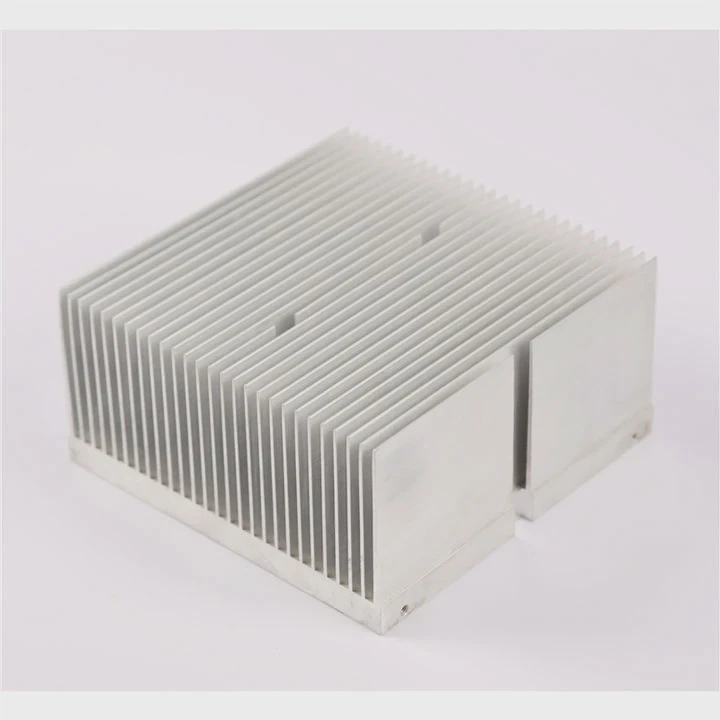
A heat sink is not a magic upgrade. It will not make a SATA SSD much faster. Its role is simple. It helps move heat away from the drive surface and into surrounding air or metal structure. That matters only when heat builds faster than it can leave.
Situations where cooling can make sense
1. Fanless or sealed systems
A fanless enclosure can trap heat. Even if the SATA SSD itself is efficient, the internal air may stay hot for long periods. In this case, a thermal pad to the chassis or a small heat spreader may help.
2. High ambient temperature
A system in a factory, outdoor cabinet, telecom box, or hot workshop may start at a higher base temperature. When room or enclosure temperature is already high, the SSD has less thermal headroom.
3. Sustained heavy writes
Video recording, logging, surveillance storage, industrial data capture, and frequent backup operations can keep the SSD busy for a long time. Under these workloads, temperature rises more than in light office use.
4. Tight drive stacking
Some systems place several drives close together. Each drive adds heat to the local area. In that setup, airflow becomes more important than the heat sink itself.
Signs that cooling deserves attention
You do not need to guess blindly. A few signs often show when cooling is worth considering.
- The drive sits in a sealed metal box
- SMART data shows high temperature during load
- Performance drops during long file transfers
- The enclosure is close to other heat-heavy parts
- The device runs nonstop in a hot room
Better cooling does not always mean a big heat sink
A better fix may be simple. Move the drive. Improve cable routing. Add a low-speed fan. Increase vent space. Use the chassis as a heat spreader. These changes often help more than attaching a decorative heat sink.
Practical rule of thumb
For a typical desktop, laptop, or office machine, no added heat sink is needed. For industrial, embedded, fanless, or sustained-write systems, temperature should be checked first. Then cooling can be added only if real heat stress appears.
This approach saves money and avoids solving a problem that may not exist. In thermal design, the best answer is often not “add more metal.” The best answer is “match the cooling method to the real load and real environment.”
Conclusion
Most SATA SSDs do not need a heat sink. Their lower interface speed keeps heat lower in normal use. Cooling only becomes important when airflow is poor, ambient temperature is high, or the workload stays heavy for long periods.




